Multi-Vendor
Firewall Lab
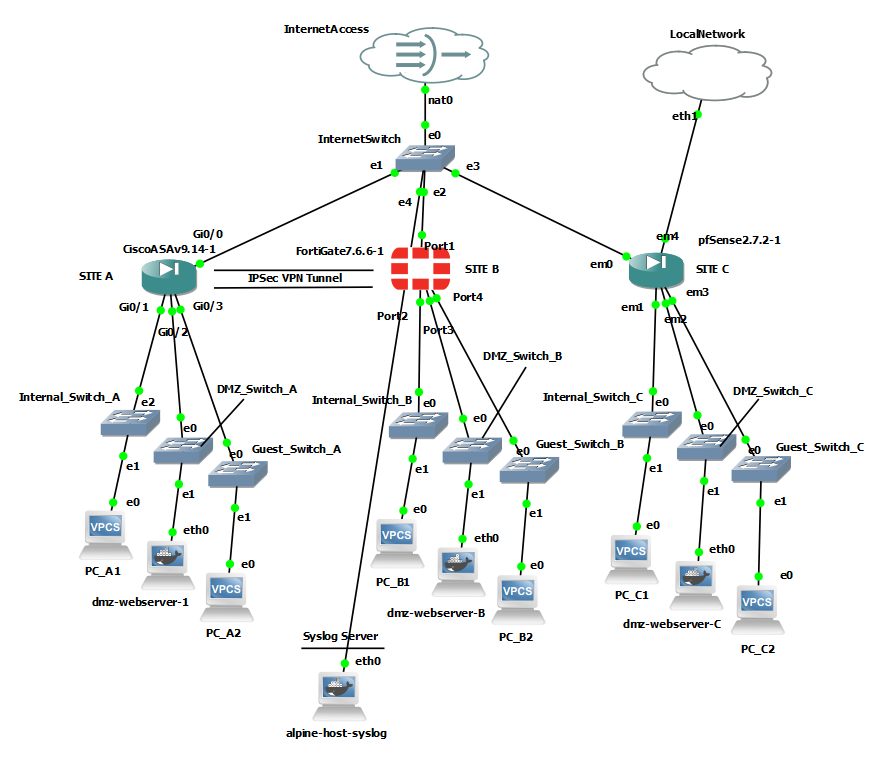
A hands-on GNS3 lab running Cisco ASAv 9.14, FortiGate-VM64 v7.6.6, and pfSense CE 2.7.2 side by side, each implementing an identical three-zone security policy across Internal, DMZ, and Guest networks. The differentiator is the comparative analysis: not just "I configured firewalls" but a documented breakdown of how each vendor handles NAT, ACLs, VPN, logging, and licensing, with observed behavior verified against live traffic, not vendor documentation.

// Section 01
Security Models
The most fundamental difference between these platforms is not syntax; it is the underlying security model. Understanding this before touching a config prevents a class of mistakes that look like bugs but are actually expected behavior.
Cisco ASAv — Security Levels
- Every interface assigned a numeric security level 0–100
- Higher-to-lower flows freely by default; lower-to-higher requires explicit ACL permit
- Critical caveat: applying an ACL via access-group completely replaces security level behavior — the ACL becomes the sole authority
- Security levels are only meaningful when no ACL is applied to that interface
FortiGate — Zone-Based Policy
- No implicit trust hierarchy — all traffic between zones requires an explicit firewall policy
- Policy must specify source interface, destination interface, source address, destination address, service, and action
- If no policy matches, traffic is denied. The most explicit model of the three
- Nothing is permitted unless you said so
pfSense — Interface Rules
- Rules applied per interface (inbound direction)
- LAN interface has a default allow-all rule out of the box
- Every other interface (OPT1, OPT2) has implicit deny with no rules
- Adding an OPT interface and forgetting to add rules means zero traffic flows — a common trap in multi-zone deployments
| Aspect | pfSense | FortiGate | Cisco ASA |
|---|---|---|---|
| Rule structure | GUI rules per interface tab | Policies: src/dst interface pairs | Named ACLs applied per interface |
| Implicit behavior | LAN allow-all; OPT deny-all | Implicit deny on all zones | Security levels (overridden by ACLs) |
| ICMP handling | Automatic stateful | Automatic stateful | Requires explicit inspect icmp |
| Config verbosity | Low (GUI clicks) | Medium (CLI blocks) | High (explicit ACE per rule) |
| Object grouping | Aliases (IP/port groups) | Address objects / service objects | object-group network/service |
// Section 02
NAT & Policy
All three platforms support outbound dynamic PAT and inbound static NAT, but the implementation philosophy differs significantly, from pfSense's zero-configuration automatic NAT to ASA's per-object explicit rules and unique twice-NAT capability.
| Aspect | pfSense | FortiGate | Cisco ASA |
|---|---|---|---|
| Outbound PAT setup | Automatic — no configuration needed | Per-policy toggle (set nat enable) | Explicit network objects + NAT rules per subnet |
| Config complexity | None | Minimal (1 line per policy) | Most verbose (object + subnet + nat rule) |
| Granularity | Low — all-or-nothing auto NAT | Medium — per-policy control | High — per-object, per-direction, supports twice-NAT |
| Inbound NAT method | Port Forward rules in GUI | Virtual IP (VIP) objects | Static NAT inside network objects |
| Firewall rule linkage | Auto-generates matching WAN rule | Policy must reference VIP as destination | ACL and NAT are fully independent |
| Best suited for | Small offices, quick deployments | Mid-size with policy-based control | Complex enterprise with granular NAT requirements |
FortiGate's VIP model is the most tightly integrated; the Virtual IP object couples NAT and access control cleanly, reducing the chance of creating a NAT rule without a corresponding policy. Cisco ASA's static NAT and ACL are completely independent, which gives flexibility but requires the administrator to maintain both in sync. ASA also supports twice-NAT (simultaneous source and destination translation in a single rule), a capability the other two platforms lack.
// Section 03
IPsec VPN
The cross-vendor IKEv2 IPsec tunnel between ASAv and FortiGate was the most technically demanding aspect of the project. Five distinct issues required resolution on what were clean, lab devices with no legacy configuration. Every issue here is representative of real-world deployment failures.
| Parameter | Phase 1 (IKE) | Phase 2 (IPsec/ESP) |
|---|---|---|
| Protocol | IKEv2 | ESP |
| Encryption | DES | DES |
| Integrity | SHA-96 (SHA-1) | SHA (SHA-1) |
| DH Group | 20 (ECP384) | None (PFS disabled) |
| Authentication | Pre-shared key | N/A |
| Lifetime | 86400 sec | 43200 sec |
// 5 Documented Troubleshooting Issues
Phase 1 established cleanly. Phase 2 failed repeatedly. The FortiGate eval license silently downgraded the ESP proposal from des-sha256 to des-sha1, regardless of configuration. PFS DH groups also didn't align between platforms.
Deleting and recreating the VPN-TRAFFIC ACL silently broke the crypto map's match address binding. The ASA reported the crypto map as incomplete but gave no alert when the referenced ACL was removed.
The FortiGate eval license prevented setting specific Phase 2 proxy IDs, defaulting to 0.0.0.0/0. The ASA's VPN-TRAFFIC ACL had specific subnets — the mismatch caused negotiation failure.
packet-tracer on the ASA reported IPSEC Spoof detected for VPN traffic. This is a packet-tracer limitation; it cannot simulate VPN decapsulation.
Configured des-sha256; FortiGate saved as des-md5 des-sha1. DH groups forced to 20/21 regardless of configuration. The saved config looked correct in the GUI but the actual negotiated proposal was different.
// Section 04
Logging
All three firewalls were configured to send syslog to a centralized rsyslog collector (Alpine Linux, 192.168.122.20:514). The format differences are significant from an operational and SIEM perspective.
| Aspect | pfSense | FortiGate | Cisco ASA |
|---|---|---|---|
| Format | BSD syslog (standard) | Structured key-value pairs | Cisco syslog with message IDs |
| Detail level | Low — basic system messages | High — full session detail | Medium — connection events |
| SIEM parseability | Standard but minimal | Excellent — key-value pairs easily parsed | Excellent — standardized message IDs widely supported |
| Traffic logging | Requires explicit log rule per rule | Automatic for all policy matches | Automatic at configured logging level |
| NAT visibility | Limited | Shows transdisp field for translation type | Explicit NAT build/teardown messages |
| Best for | Small deployments, simple monitoring | Detailed forensics, compliance, structured analysis | Enterprise SIEM integration, Cisco-centric SOCs |
A subtle but operationally important difference: ASA does not track ICMP sessions by default. Pings from INSIDE hosts would leave the firewall but ICMP replies from the internet would be dropped on return, with no session state entry to match against. Fix: inspect icmp in the global policy map. Both FortiGate and pfSense handle ICMP statefulness automatically.
// Section 05
Platform Comparison
CLI vs. GUI management, config persistence, and restart resilience: three operational dimensions that don't show up in feature matrices but matter every day in production.
| Aspect | Cisco ASA | FortiGate | pfSense |
|---|---|---|---|
| Primary interface | CLI | CLI + GUI (both equal) | GUI |
| GUI quality | Poor (ASDM/Java) | Excellent | Good |
| Config persistence | write memory required | Auto-saves on next/end | "Apply Changes" required |
| Safety net | Separate run/start config — reload reverts mistakes | None — every change is immediately permanent | Staged changes can be applied in bulk |
| Troubleshooting tools | packet-tracer, debug crypto, show asp drop | diagnose debug flow, diagnose vpn ike | GUI log viewer; CLI requires FreeBSD knowledge |
| Restart resilience | Known GNS3 bug: ASAv WAN interface corrupts after VM suspend/resume | Clean recovery — interface comes up | Clean recovery — interface comes up |
The ASAv restart issue deserves a callout: after GNS3 VM suspend/resume, the ASAv WAN interface failed to pass traffic. DHCP wouldn't assign an address; a static assignment couldn't ping the gateway. ARP resolved correctly, the interface showed up/up, and show asp dropshowed l2_acl and acl-drop drops. Removing all ACLs didn't help. This is a GNS3/ASAv QEMU platform bug where the virtual NIC state corrupts after suspend/resume (not a configuration issue). Both pfSense and FortiGate recovered cleanly.
// Section 06
Deployment Guide
The most important licensing finding from this lab: with License Status: Invalid, FortiGate accepts packets, processes them through the flow engine (DNAT check, route lookup), but silently drops all forwarded traffic before the policy engine evaluates them. Firewall policies can be created and saved, but no traffic is forwarded between interfaces. Confirmed via diagnose debug flow — packets hit iprope_dnat_check and route lookup but never reached iprope_fwd_check. This is intentional enforcement, not a misconfiguration. Always verify license status (get system status) before troubleshooting a FortiGate that appears configured but passes no traffic.
Free, runs on commodity hardware, covers all standard firewall requirements (zone-based rules, NAT, VPN, DHCP, DNS) without needing a dedicated network security engineer. The GUI is approachable for IT generalists. Reconsider if the org has Cisco-centric staff or an existing FortiGate reseller relationship.
Enterprise-grade features (IPS, application control, SSL inspection, SD-WAN), a genuinely good GUI for day-to-day management, strong logging and visibility, and competitive TCO compared to Cisco. FortiOS CLI depth is sufficient for complex configurations. Also maps well to NSE certification paths for staff development.
For environments with complex NAT requirements (twice-NAT, policy NAT), existing Cisco infrastructure (ISE, switches, routers), or Cisco TAC contracts, ASA/Firepower is the natural fit. Note: Firepower (NGFW) has largely superseded ASA for new enterprise deployments. FortiGate scales to enterprise with appropriate hardware and FortiManager for centralized management.
// Section 07
Key Takeaways
- 01 — No platform wins on all criteria. ASA wins on NAT granularity and troubleshooting tools. FortiGate wins on logging depth and GUI quality. pfSense wins on cost and simplicity.
- 02 — Licensing behavior is not just a cost consideration. FortiGate's unlicensed VM silently drops all forwarded traffic — packets hit the flow engine but never reach the policy check. This looks like a misconfiguration and is not.
- 03 — Cross-vendor VPN requires parameter discipline. Every mismatch (encryption, integrity, DH group, proxy IDs, PFS) produces a failed tunnel. Document expected parameters on both sides before starting. Verify actual saved config after applying.
- 04 — Implicit deny and implicit permit differences are significant in multi-zone deployments. pfSense's default allow-all on LAN creates risk when adding OPT interfaces. ASA's security levels are invisible once ACLs are applied. FortiGate's explicit deny-all is the most predictable model.
- 05 — Syslog is not equal across vendors. FortiGate's structured key-value session logs are SIEM-ready with no parsing effort. ASA's message IDs are well-supported by legacy SIEM tools. pfSense requires additional configuration to produce useful syslog output.
- 06 — Config persistence models have real operational consequences. FortiGate's auto-save removes the 'forgot to write memory' failure mode but eliminates the ability to revert via reload. ASA's separate running/startup config is a genuine safety net in production.
// Cert Alignment
NSE 4 — FortiGate Preparation
- Hands-on FortiOS CLI and GUI configuration
- FortiGate zone-based policy model and VIP objects
- FortiGate IKEv2 IPsec configuration and diagnose debug flow
- Licensing behavior and eval VM limitations documented
CCNP ENCOR — Direction
- Cisco ASAv security level model and ACL architecture
- Crypto map VPN configuration (policy-based IPsec)
- packet-tracer and show asp drop troubleshooting workflow
- Cross-vendor VPN interoperability and parameter alignment
// Lab Environment